
Rocket Building
Using tools to build the tools that make the thing
I Asked AI to Build a Rocket Fin Jig. Now My Kids and I Build Faster.
The crooked fin problem
If you have ever built a model rocket with kids, you know the moment. The glue is wet, the fin is drooping, and someone asks if its ready yet.
Gluing fins on straight is the hardest part of a basic rocket build. A fin that leans a few degrees makes the rocket spin or wobble. Fins that are not evenly spaced can send it off sideways. And holding three or four fins perfectly still while glue sets is a lot to ask of small hands. It is a lot to ask of big hands too.
I wanted a tool that would make this part faster and more precise, so my kids could spend more time painting and launching. I have a Glowforge laser cutter in the shop. What I did not have was a drawing for the tool. So I asked AI to make one. A few short messages later, I had a full set of files ready to cut.
What a fin jig does
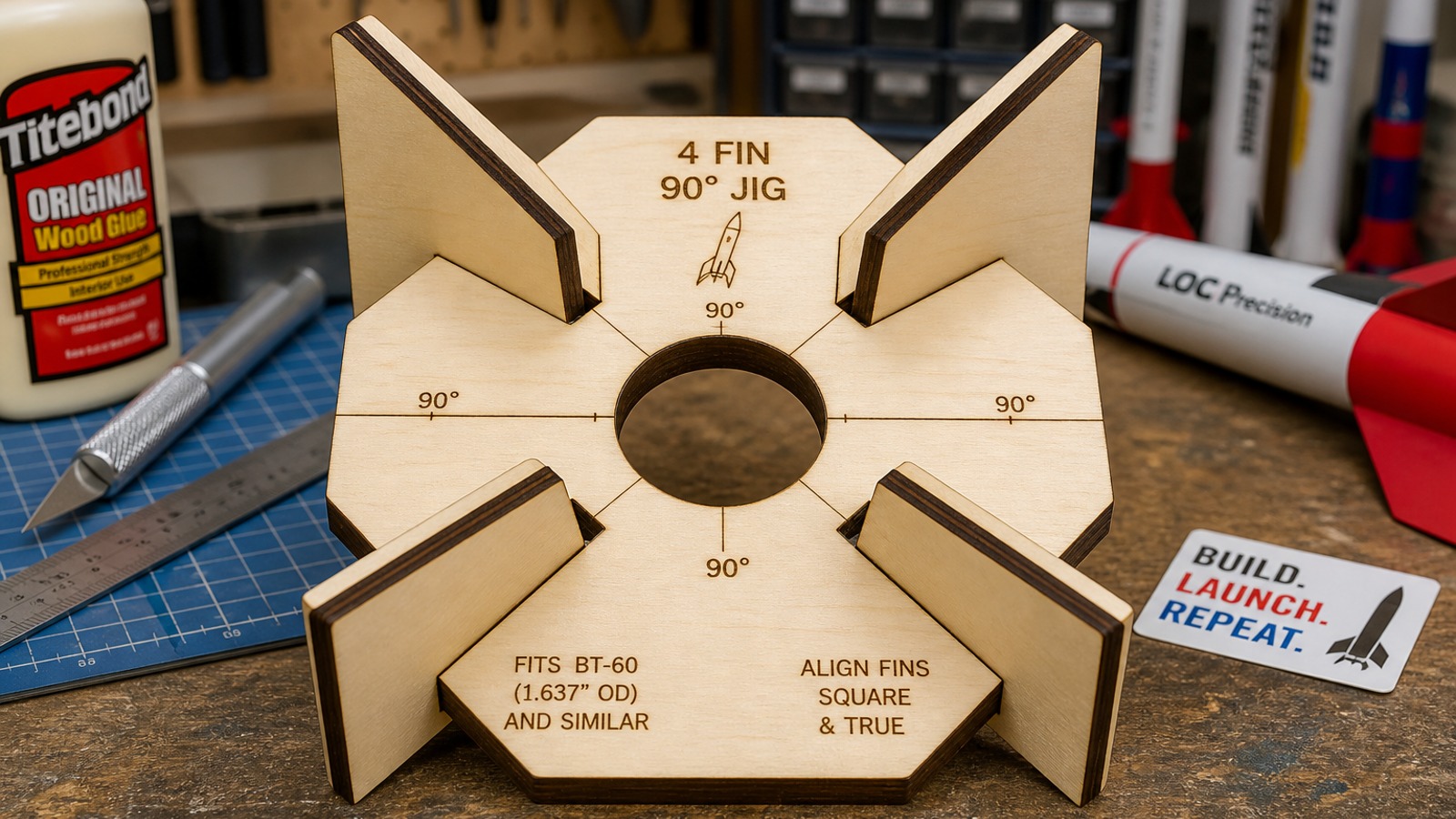
A fin jig is a guide that holds fins in the right place while glue dries. Mine is a flat disc with a round hole in the middle and narrow slots around it.
Here is how it works:
- Slide two jigs onto the rocket's body tube. One goes near the tail and one sits a little higher, near the front edge of the fins.
- Drop each fin into its matching slots. The slots run straight out from the tube, so the fins point straight out too.
- Wrap a rubber band around the fins to press their roots against the tube.
- Glue them and let them dry.
Using two jigs is the key. One disc keeps the fins evenly spaced around the tube. A second disc, a few inches away, keeps them from leaning. Together they lock every fin in place.
Rocket shops sell fin jigs, and they work well. But many of them fit only one tube size or one fin count. If you have a laser cutter, you can make a jig for every rocket on your workbench.
Talking a design into existence
I did not open a drawing program. I typed one plain-English request: make an SVG for my Glowforge. It should have a round hole in the center and slots for three or four fins. I slide it over the body tube and hold the fins with a rubber band while the glue dries.
The AI did not start drawing right away. First it asked three questions:
- What size body tubes? I picked BT-50, BT-60 and BT-80, three common Estes sizes.
- How thick are the fins? Mine are 1/8 inch plywood and balsa.
- Three fins or four? Both, please.
Those were the right questions. They are the same ones a friend with a workshop would ask. A jig that is off by a sixteenth of an inch is useless, so the AI got the measurements before it drew anything.
Then it built the files. It did not draw each jig by hand. It wrote a short program that does the geometry: work out where each slot goes around the circle, find where each slot meets the center hole, and trace one clean cut line around all of it. The program then made six files, one for each tube size and fin count. Each file holds two jigs, since you need a pair.
It also made some smart calls I had not thought to ask for:
- A little extra room. The center hole and slots are 0.004 inch bigger than the tube and fin, so parts slide in without forcing.
- Open slots. Each slot runs right into the center hole, so the fin root touches the tube where the glue goes.
- A solid outer rim. The slots stop short of the edge, so the disc stays stiff.
- A check of its own work. Before handing the files over, it drew a picture of them and looked to make sure the slots were even.
The last one surprised me. It is what a careful person does before sending something out the door.
Making it better, one sentence at a time
The best part came after the first draft. Changing the design took one more message, not an evening of redrawing.
Round two: one jig for every rocket. I asked if the three-fin and four-fin layouts could share one disc. Yes, it said. The two layouts share a slot, so the combined jig has six slots instead of seven. Then it solved a problem I had not seen yet: with six slots, how do you know which ones to use? It added small engraved marks. Dots point to the three-fin slots. Squares point to the four-fin slots. The shared slot gets both.
It also gave me a fair warning. On the smallest tube, two slots end up close together near the hole. Only about 1/8 inch of material sits between them. That is fine in plywood, but it could crack in acrylic. I like a tool that tells me the downside without being asked.
Round three: a ruler for the laser. Laser cutters burn away a thin line of material as they cut. That line is called the kerf. It makes holes a bit bigger and cut-out pieces a bit smaller than the drawing. So I asked for a 1 inch scale for calibration.
The AI added two things to every file. One is an engraved 1 inch ruler with tick marks every 1/8 inch. Engraving does not lose material, so it shows if the file came in at the right size. The other is a cut 1 inch square. Measure that square with calipers, and the amount it comes up short is your kerf. If the square reads 0.993 inch, you lost about 0.007 inch to the laser. Then you know how much to adjust the jig.
Try it yourself
You do not need to know how to code or use design software. You need a clear request and a few measurements. Here is what worked for me.
- Measure first. Write down your body tube's outside diameter and your fin thickness. Calipers are best. If you use a kit, the tube name (like BT-50) is often enough.
- Describe the job, not just the shape. I did not just ask for a circle with slots. I explained how I would use it: slide it on, add the fins, wrap a rubber band, glue. That helped the AI make good choices, like slots that touch the tube.
- Name your machine. Say "Glowforge SVG" or whatever cutter you have. The AI will set the size in real inches and use the right colors for cut and engrave lines.
- Ask for the generator, too. Ask for the small program that builds the files. If your test fit is off, you change one number and rebuild all the files in seconds.
- Cut a test piece. Cut one jig in cheap cardboard before using good plywood. Check the fit on a real tube.
- Ask follow-up questions. If something feels off, say so in plain words. "The slots are too loose" is a perfectly good instruction.
A few shop tips:
- Use wax paper or tape on the jig. The jig sits right at the glue joint. Without a barrier, you may glue the jig to the rocket.
- Tack, then fillet. Tack the fins with a small amount of glue, remove the jigs once it sets, then add the glue fillets along each fin.
- Label your jigs. Write the tube size on each one with a marker. A pile of discs gets confusing fast.
What AI is really good at here
This project did not replace any skill I care about. My kids still sand the fins, glue them on, paint the rocket and press the launch button. That is the fun part, and it is still ours.
What AI took over was the boring middle step. That is the math of spacing slots evenly around a circle, the fussy CAD work, and redrawing everything after one small change. That step is often why a good shop idea never gets built. Removing it means more ideas actually make it to the workbench.
The back-and-forth felt like working with a patient helper who is great at geometry. It asked good questions. It explained its choices. It warned me about weak spots. And when I wanted changes, I just asked.
If you have a laser cutter, a 3D printer or even a printer and scissors, try it. Think of the tool that would make your next project easier. Then describe it in plain words and see what comes back. Start with something small, like a fin jig. Your rockets may fly straighter.